


USB reader
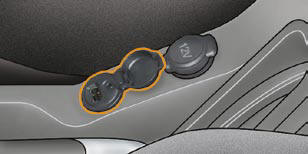
This connection box, consisting of a JACK socket and a USB port, is located on the centre console.
It permits the connection of portable equipment, such as a digital audio player of the iPod ® or USB stick type.
It reads the audio fi le formats (mp3, ogg, wma, wav...) which are transmitted to your audio equipment and played via the vehicle's speakers.
You can manage these fi les using the steering wheel controls or the audio equipment control panel and display them on the multifunction screen.
When it is in use, the portable equipment charges automatically.
For further details concerning the use of this equipment, refer to the Audio system part of the "Audio and Telematics" section.
See also:
Front seat belts
The front seat belts are fi tted with a pretensioning
and force limiting system.
This system improves safety in the front
seats in the event of a front impact.
Depending on the severity of the imp ...
Windows
Electric windows
The driver uses the controls located on the door to operate the vehicle’s electric
windows.
Note: the electric windows can also be operated for a limited time
after the igniti ...
Accessories
A wide range of CITROËN replacement parts and accessories is available from the
dealer network. They are all from the CITROËN catalogue. After being tested for
reliability and safety, ...